



 Click it and Unblock the Notifications

Once a year, pensioners are required to furnish a "Life Certificate" to Pension Disbursing Authorities (PDAs) such as the banks, the post offices etc. either by presenting themselves personally or by delivering a life certificate in the prescribed format.
In 2014, to lower hardships to aged pensioners, the government had launched Digital Life Certificate for Pensioners Scheme of the Government of India (EPS), known as the Jeevan Pramaan.
Jeevan Pramaan enables the pensioner to generate a digital life certificate using a software application and secure Aadhaar based Biometric Authentication System. The Digital Life Certificate (DLC) generated is stored online and can be accessed by the pensioner & the Pension Disbursing Agency as and when required by them.
Earlier this week, the Employees' Provident Fund Organisation (EPFO) said that pensioners of the Employees' Pension Scheme 1995 could submit their life certificates to continue drawing pension through the Umang app, the EPFO's regional and district offices, pension disbursing banks and post offices.
Earlier, the pensioners would have to submit their certificates in November but now, especially due to the pandemic situation, they can submit it at any time of the year.
Requirements to get Jeevan Pramaan over UMANG app
To be able to generate Jeevan Pramaan Certificate or Digital Life Certificate, the pensioner needs to have Aadhaar. Further, a mobile number needs to be registered with the Aadhar (for OTP based authentication) and needs to be in active condition.
The Aadhaar also needs to be registered with the Pension Disbursing Agency (that is your bank, etc) as it is required to process the pension.
Make sure the mobile phone you use supports *USB OTG (On the Go). Also, ensure that the "OTG" permission is enabled as a few of the handsets ask for specific permissions. The OTG is a feature on your phone that allows USB devices, like a biometric reader to be attached to it to use it (phones) as a host and supply power to the biometric device so that it can be used.
Steps to download/generate life certificate on UMANG app
- Download the UMANG app on your smartphone. Look for UMANG by MeitY, Government of India.
- Open the app on your phone and create an account by choosing the "Register" option on the app.
- Once registration has been completed and you have logged into the account, tap on "Social Security" within "Categories".

- Then tap on "Jeevan Pramaan" in the next page.
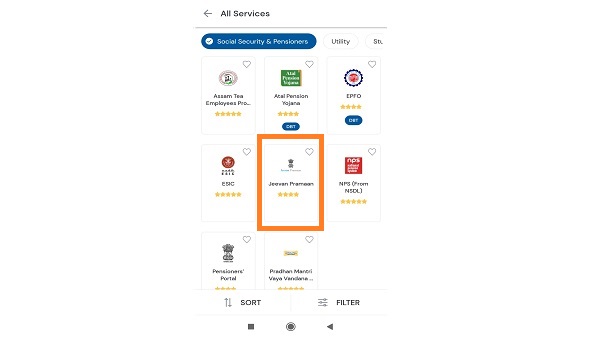
- In the next page choose the "Generate Life Certificate" option.
- For user authentication purposes, you will have to enter the Aadhaar and mobile number of the pensioner.
- Tap on "Generate OTP".
- You will be taken to "Select the Biometric device" screen. Pick the one from the list connected with the handset.
- In the next screen, tap on the "Install" option which shall take to the RD service mobile application as provided by the device manufacturer. After installing the RD service, wait for a few minutes for the device to update. You can refer the user manual provided by the device manufacturer for help.
- After installing RD Service, return to the UMANG app and tap on "Next". An OTP will be sent on the mobile number entered in Step 6. Enter the OTP and tap on "Submit".
- You will see a message saying "Installed" on the screen, indicating the installation of the RD service Mobile app from the device manufacturer.
- The Pensioner Authentication Screen will appear on the next page. Here enter pensioner's details like name, PPO number, account no, e-mail. Choose appropriate pension-type, sanctioning authority, disbursing agency, agency from the drop-down list, select remarried options, re-Employed options.
- Also, click the small grey box. Read the consent before tapping on "submit".
- Click on "Scan Finger" and place your finger on the Biometric device.
- On successful authentication, the life certificate of the pensioner is displayed. The life certificate has a unique Pramaan ID, which shall be SMSed to the pensioner on the mobile number provided by him/her in the previous steps.
- The Pramaan ID can be used anytime to download the digital life certificate from the service "View Life Certificate" available on UMANG app.


More From GoodReturns

Gold Rate in India Rises Over Rs 37,000/24K in Three Days; Will Jump in Gold Price Today Continue on 31 March?

Gold Rate Today Continues Rally, 24K Jumps Over Rs 35000 in 2 Days; 22K & 18K Gold, Silver Prices in Delhi

LPG Gas Cylinder Prices Hiked Again From April 1; 19 KG LPG Gets Costlier By Rs 218; 14.2 KG LPG Unchanged

New PAN Card Rules From April 1, 2026: How To Apply For New PAN Card Via Protean, E-Filing Portal?

5 New Shares On One Soon: Anil Agarwal's Vedanta Demerger To Take Place in April, Says Report

Fresh Drop in Gold Rate Today; Silver Stable: Latest 22K, 24K, 18K Gold & Silver Prices in Delhi on 30 March

Govt Approves PDS Kerosene Distribution in 21 States for 60 Days, Sets 5,000 L Storage Limit Amid LPG Crisis

Gold Rate in India After 20% Slide from Record Highs; Will Gold Price Today Jump to Rs 1.50 Lakh on 30 March?

Bank Holiday Today, Tomorrow & More: Banks Are Closed On March 31, April 1, April 2, April 3; Here's Why

Bank Holiday In April 2026: Banks To Be Closed For 14 Days; Good Friday, Baisakhi To Akshaya Tritiya

Gold Price in India Rallies Rs 47400/100 Gm in 5 Days Amid Rupee Fall, Iran-US War, Silver Shines | March 31


 Sign in with Google