



 Click it and Unblock the Notifications

The State Bank of India (SBI) has the largest customer base with the widest reach in the country. However, these days, account holders prefer making all their banking transactions within the convenience of their laptop or smartphone rather than visiting the branch.
To make their services more convenient, SBI now allows customers to finish their complete registration process for the net banking facility online. Earlier, one needed to go to the branch to get your SBI net banking activated which required filling applications and waiting for a pre-printed "Internet Banking Kit."
Things to note before you get started
- To activate the facility, your correct (and active) phone number needs to be registered with SBI and linked to your account. You also need to have an active ATM card.
- If you have already applied for net banking through the branch, you cannot register online. You will have to wait for the kit.
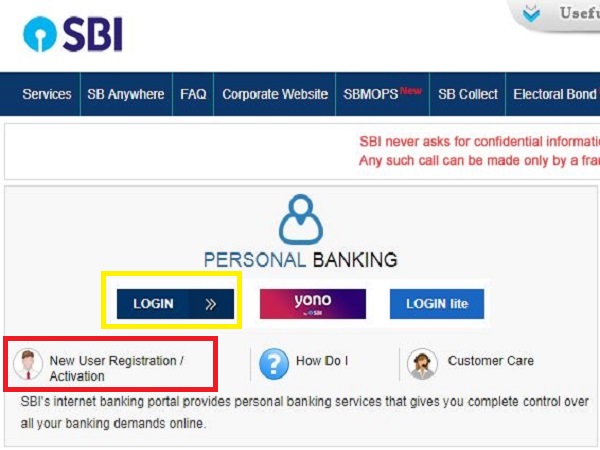
- If you already have the "Internet Banking Kit," do not "register" because the bank has already created a username and password for you (mentioned in the kit), that you can use to directly login. In the second step below, choose "Login" (boxed yellow) instead of registering.
- Joint account holders will be required to visit the branch to avail the net banking facility.
Step by step procedure for SBI net banking registration online
- Visit www.retail.onlinesbi.com
- On the left-hand side (top) of the homepage, you should be able to see the "New User Registration/Activation" option (boxed red in the picture below). Click on it. Please note that a pop-up will appear. Click "OK" only if you have not applied for net banking at the branch and this is your first-time registration.
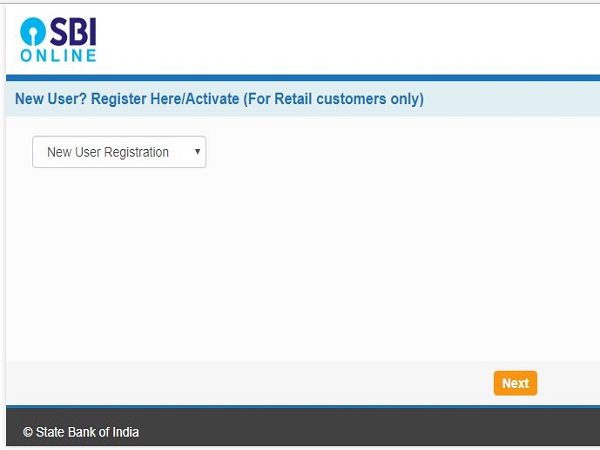
- In the new tab opened in front of you, choose "New User Registration," and hit "Next."
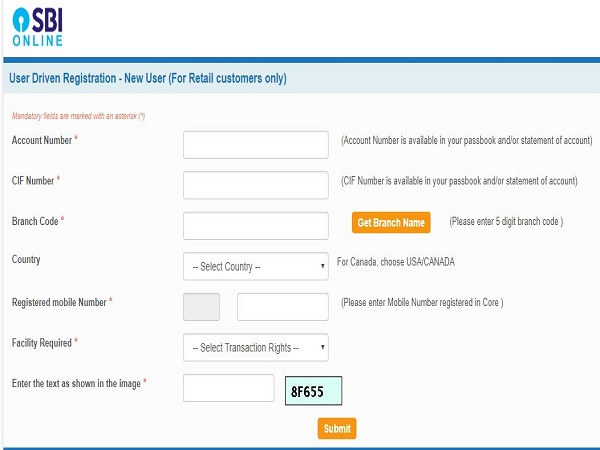
- On the next page, (shown below) you will have to provide details like account number, CIF number and branch code, which are all available on the first page of your passbook. Also, fill in your registered mobile number and select the "facility required" from the drop-down. Do not forget to fill in the captcha text displayed in the box. Click on "Submit."
- You will receive an "OTP" (one-time password) on your registered mobile number. Enter it in the space provided and click "confirm."
- Choose the "I have my ATM card (online registration without branch visit)" option and "submit."
- Enter your card number (printed on the front side of your ATM card) and the captcha code displayed.
- In the following page, you will be given a temporary username which you can note down securely for future use and create a login password. The password will need to have a minimum of 8 characters with at least one upper case alphabet, one lower case alphabet, one number and one special character.
- It is advisable to login into the SBI net banking facility one hour later and create a new username. Click on the checkbox to accept the terms and conditions of the bank. You will also be required to create a new login password and a profile password. Note that the two passwords serve different purposes.
- You will also be asked to choose and answer a couple of security questions. These will be helpful in recovering your password, in case you ever forget it.
- Enter the date of birth, place of birth and mobile number (registered) as per the bank's record.
- Click "submit." You should now be able to use your SBI net banking facility.


More From GoodReturns

New PAN Card Rules From April 1, 2026: How To Apply For New PAN Card Via Protean, E-Filing Portal?

LPG Gas Cylinder Prices Hiked Again From April 1; 19 KG LPG Gets Costlier By Rs 218; 14.2 KG LPG Unchanged

Gold Rate in India Rises Over Rs 37,000/24K in Three Days; Will Jump in Gold Price Today Continue on 31 March?

Gold Rate in India Rebounds After Falling Nearly Rs 40,000 In a Day; Will Gold Price Today Jump or Drop?

Gold Price Today Declines After 3-Day Surge; Check Latest 22K, 24K, 18K Gold & Silver Rates in Delhi on 2April

Bank Holiday In April 2026: Banks To Be Closed For 14 Days; Good Friday, Baisakhi To Akshaya Tritiya

Hyderabad Gold Rates Today Crash By Rs 40,000 After 6 Days, Silver Rate Falls By Rs 10,000: 24K, 22K, 18k Gold

Bank Holiday Today, Tomorrow & More: Banks Are Closed On March 31, April 1, April 2, April 3; Here's Why

Gold Price in India Rallies Rs 47400/100 Gm in 5 Days Amid Rupee Fall, Iran-US War, Silver Shines | March 31

Stock Market Holidays In April 2026: Why Trading On BSE, NSE Will Be Closed For Ten Days? Check Reason

NSE IPO 2026: OFS Window Opens, April 27 Deadline Key for Shareholders; Check Eligibility, Lock-in Rules


 Sign in with Google