



 Click it and Unblock the Notifications
How to Link Aadhar to your Airtel Number Online? For Senior Citizens, NRIs & Physically Handicapped
Last year, the only way to link your Airtel sim to your Aadhar number was to physically go to their store. Fortunately, Bharathi Airtel has now launched its online facility to link Aadhar. This will e

Last year, the only way to link your Airtel sim to your Aadhar number was to physically go to their store. Fortunately, Bharathi Airtel has now launched its online facility to link Aadhar. This will especially benefit senior citizens, NRIs (Non-Resident Indians) and physically handicapped individuals.

This online facility to link your Aadhar to your Airtel number does not require biometric validation. This means that one doesn't need to provide fingerprint verification. It will help individuals whose fingerprints have worn out or cannot visit stores for various reasons.
Please note that this facility can only be availed by senior citizens (over 70 years), physically handicapped, NRIs and those with worn out fingerprints, whose mobile numbers are not registered with UIDAI (Unique Identification Authority of India).
Steps:
- Go to this link.
- Select your category from the following.
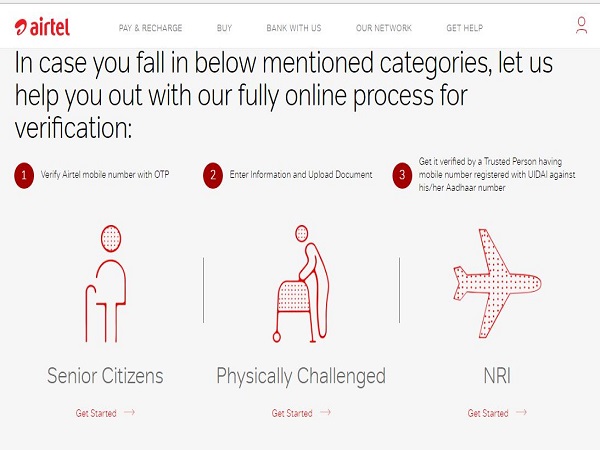
How to Link Aadhar to your Airtel Number Online? - Enter your mobile number in the space provided and click the boxes for declaration. In point number 2 of the declaration select any one of the relevant selection and hit submit.
- It should look like this for senior citizens.

How to Link Aadhar to your Airtel Number Online? - On submitting, an OTP (One Time Password) will be generated and sent to your number. Fill it in the space provided.
- Fill in your details and upload scanned copies of your photograph and government POI (Proof of Identity). Physically challenged individuals will have to submit a scanned copy of the certificate of physically challenged, and NRI will have to submit a scanned copy of their passport and visa.
- On submitting the form, an 8-digit transaction ID valid for 48 hours shall be displayed on the screen. Share it with a trustworthy individual whose mobile number is registered with the UIDAI.
- This individual will have to enter your phone number and transaction ID on Airtel's portal.
- The portal will then prompt for your trusted individual's Aadhar number. Airtel will then send an OTP request to UIDAI for the trusted person's details.
- The trusted person will receive an OTP on their registered mobile number that he/her needs to enter the same on the portal to complete the process.
- Airtel will now receive his/her KYC details from UIDAI and store the details in the electronic form that you initially submitted. You and your trusted person should receive confirmation messages about the completion of verification process.


 Sign in with Google